预览在线文档
预览在线文档
预览在线文档
鸿蒙的 filePreview(文件预览)支持文件预览,我们在线文档地址需要转换为沙盒的路径才能正常预览,转化到沙盒就需要下载到本地:
下载到本地
1
2
3
4
5
6
7
8
9
10
11
12
13
14
15
16
17
18
19
// 下载在线文件到本地
async downloadFile(onlineUrl: string) {
  const context = getContext(this) as common.UIAbilityContext;
  const fileName = onlineUrl.split('/').pop() || 'tempfile.pdf';
  this.localFilePath = `${context.filesDir}/${fileName}`;

  // 检查文件是否已存在
  if (!fs.accessSync(this.localFilePath)) {
    await request.downloadFile(context, {
      url: onlineUrl,
      filePath: this.localFilePath
    }).then((task: request.DownloadTask) => {
      return new Promise<void>((resolve, reject) => {
        task.on('complete', () => resolve());
        task.on('fail', (err) => reject(err));
      });
    });
  }
}
文件预览
1
2
3
4
5
6
7
8
9
10
11
12
13
14
15
16
17
18
19
20
21
22
23
24
25
26
27
28
29
30
31
32
33
34
35
36
37
// 文件预览
async filePreview(url: string) {
  let uiContext = this.getUIContext().getHostContext() as Context;
  // 获取文件后缀名
  const suffix = url.match(/\.([0-9a-z]+)(?:[?#]|$)/i)?.[1] || '';
  // 下载文件到沙盒
  await this.downloadFile(url);
  // ⚠️将沙箱路径转换为合法的URI
  // ⚠️输出格式如:file://com.xiaota.lxyj/data/storage/.../temp.pdf
  const fileUriStr: string = fileUri.getUriFromPath(this.localFilePath);

  let displayInfo: filePreview.DisplayInfo = {
    x: 100,
    y: 100,
    width: 800,
    height: 800
  };
  let fileInfo: filePreview.PreviewInfo = {
    title: item.name,
    uri: fileUriStr,
    mimeType: PreviewUtil.mimeTypes.get(suffix) ?? 'text/plain'
  };
  // 判断文件是否支持预览,支持就返回 true
  filePreview.canPreview(uiContext, fileInfo.uri).then((result) => {
    // 此处返回true
    if (result) {
      filePreview.openPreview(uiContext, fileInfo, displayInfo).then(() => {
      }).catch((err: BusinessError) => {
        Toast.show('预览失败')
        console.error(`预览失败:err.code = ${err.code}, err.message = ${err.message}`);
      });
    }
  }).catch((err: BusinessError) => {
    Toast.show('预览失败')
    console.error(`预览失败:err.code = ${err.code}, err.message = ${err.message}`);
  })
}
工具方法
1
2
3
4
5
6
7
8
9
10
11
12
13
14
15
16
17
18
19
20
21
22
23
24
25
26
27
28
29
30
31
32
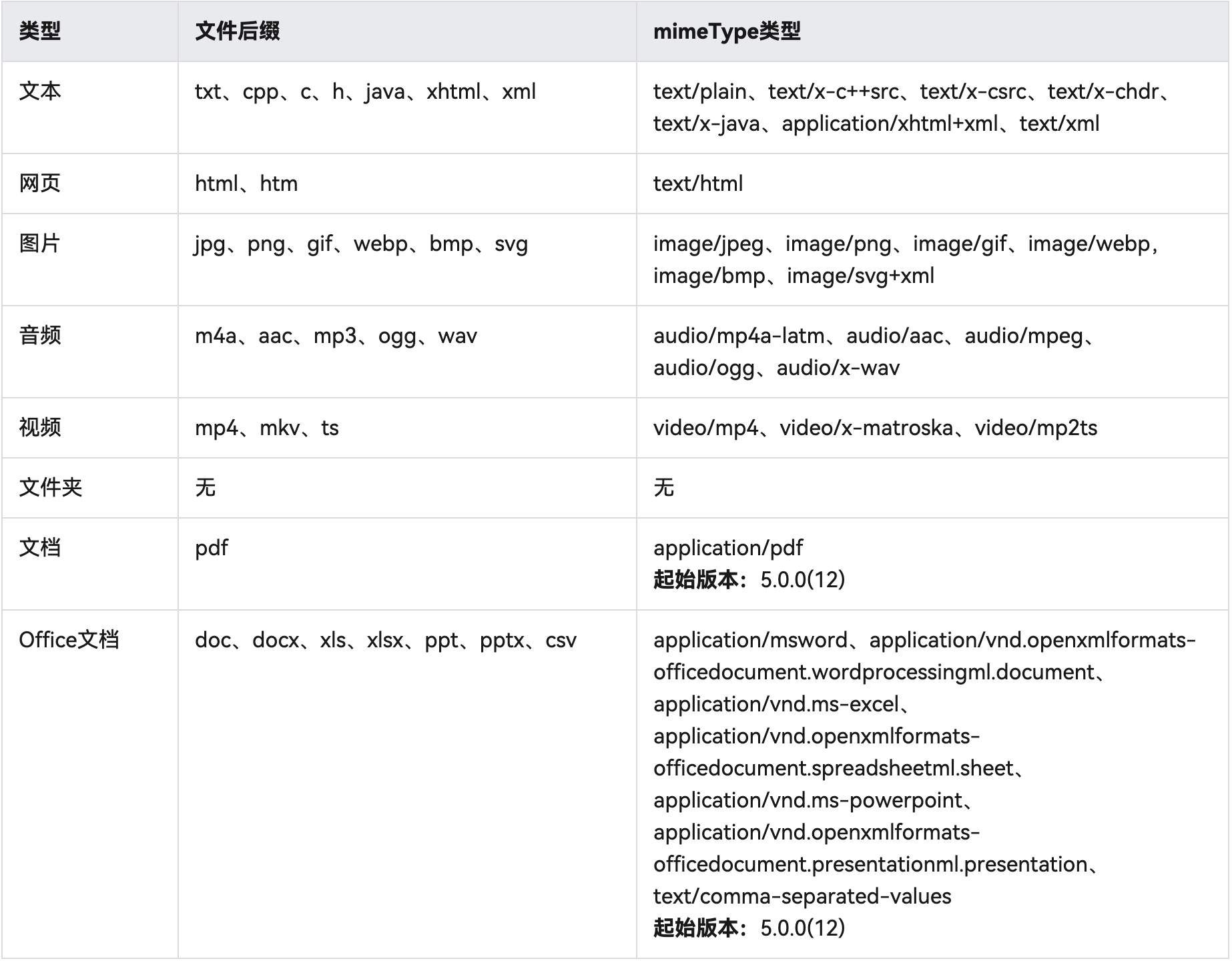
const mimeTypes = new Map([
  ['txt', 'text/plain'],
  // cpp、c、h、java、xhtml、xml
  ['cpp', 'text/x-c++src'],
  ['c', 'text/x-csrc'],
  ['h', 'text/x-chdr'],
  ['java', 'text/x-java'],
  ['xhtml', 'application/xhtml+xml'],
  ['xml', 'text/xml'],
  // html、htm
  ['html', 'text/html'],
  ['htm', 'text/html'],
  // m4a、aac、mp3、ogg、wav
  ['m4a', 'audio/mp4a-latm'],
  ['aac', 'audio/aac'],
  ['mp3', 'audio/mpeg'],
  ['ogg', 'audio/ogg'],
  ['wav', 'audio/x-wav'],
  // mp4、mkv、ts
  ['mp4', 'video/mp4'],
  ['mkv', 'video/x-matroska'],
  ['ts', 'video/mp2ts'],
  ['pdf', 'application/pdf'],
  // doc、docx、xls、xlsx、ppt、pptx、csv
  ['doc', 'application/msword'],
  ['docx', 'application/vnd.openxmlformats-officedocument.wordprocessingml.document'],
  ['xls', 'application/vnd.ms-excel'],
  ['xlsx', 'application/vnd.openxmlformats-officedocument.spreadsheetml.sheet'],
  ['ppt', 'application/vnd.ms-powerpoint'],
  ['pptx', 'application/vnd.openxmlformats-officedocument.presentationml.presentation'],
  ['csv', 'text/comma-separated-values'],
]);
本文由作者按照 CC BY 4.0 进行授权