Ajax介绍及使用
Ajax 介绍及使用
Ajax介绍及使用
Ajax 介绍及使用
Ajax简介
Asynchronous JavaScript and XML(异步的 JavaScript 和 XML)
是一种创建交互式网页应用的网页开发技术,可以在不重新加载整个网页的情况下,与服务器交换数据,并且更新部分网页
注意:ajax本身不支持跨域请求,需要在服务器端处理。
Ajax 工作流程图
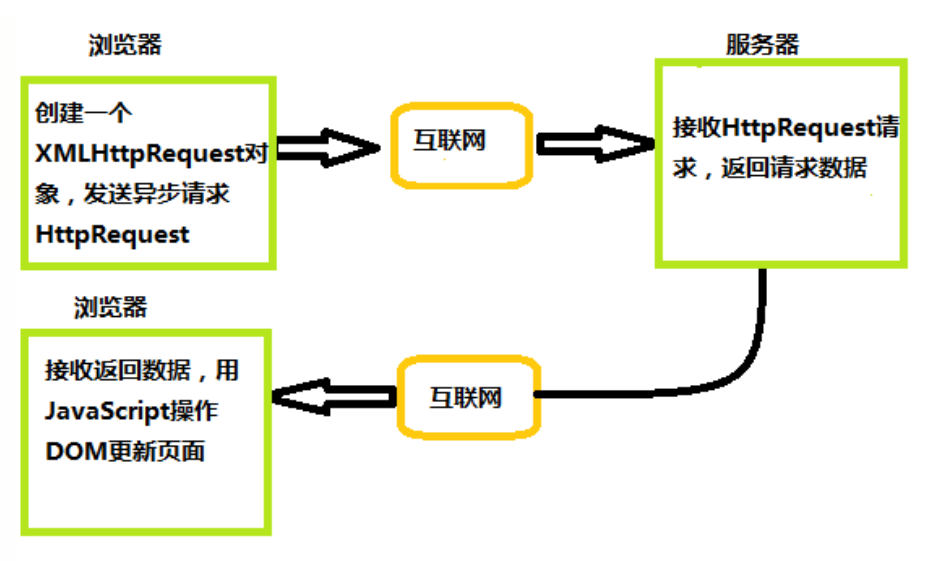
Ajax是基于现有的Internet标准
- XMLHttpRequest 对象 (异步的与服务器交换数据)
- JavaScript/DOM (信息显示/交互)
- CSS (给数据定义样式)
- XML (作为转换数据的格式)
AJAX应用程序与浏览器和平台无关的!
实现过程
- 创建 Ajax 的核心对象
XMLHttpRequest对象 - 通过 XMLHttpRequest 对象的 open() 方法与服务端建立连接
- 构建请求所需的数据内容,并通过XMLHttpRequest 对象的 send() 方法发送给服务器端
- 通过 XMLHttpRequest 对象提供的 onreadystatechange 事件监听服务器端你的通信状态
- 接受并处理服务端向客户端响应的数据结果
- 将处理结果更新到 HTML页面中
Ajax 使用步骤
创建 XMLHttpRequest 对象
1
2
3
4
5
6
7
var xhr = null;
if(window.XMLHttpRequest){
  xhr = new XMLHttpRequest();
} else {
  //为了兼容IE6
  xhr = new ActiveXObject('Microsoft.XMLHTTP');
}
连接服务器
通过 XMLHttpRequest 对象的 open() 方法与服务器建立连接
1
xhr.open(method, url, [async][, user][, password]);
method:表示当前的请求方式,常见的有GET、POSTurl:服务端地址async:布尔值,表示是否异步执行操作,默认为trueuser: 可选的用户名用于认证用途;默认为`nullpassword: 可选的密码用于认证用途,默认为`null
发送请求
通过 XMLHttpRequest 对象的 send() 方法,将客户端页面的数据发送给服务端
1
xhr.send([body]);
body: 在 XHR 请求中要发送的数据体,如果不传递数据则为 null
如果使用GET请求发送数据的时候,需要注意如下:
- 将请求数据添加到open()方法中的url地址中
- 发送请求数据中的send()方法中参数设置为null
接收返回数据 - 绑定onreadystatechange事件
onreadystatechange 事件用于监听服务器端的通信状态
1
2
3
4
5
6
7
8
9
10
11
12
13
14
15
16
17
18
19
20
21
22
23
24
25
26
27
28
29
30
31
/*
** 每当readyState改变时,就会触发onreadystatechange事件
** readyState属性存储有XMLHttpRequest的状态信息
** 0 :请求未初始化
** 1 :服务器连接已建立
** 2 :请求已接受
** 3 : 请求处理中
** 4 :请求已完成,且相应就绪
*/
xhr.onreadystatechange = function(){
  if(xhr.readyState === 4){ // 整个请求过程完毕
    /*
    ** Http状态码
    ** 1xx :信息展示
    ** 2xx :成功
    ** 3xx :重定向
    ** 4xx : 客户端错误
    ** 5xx :服务器端错误
    */
    if(xhr.status == 200){
      success(xhr.responseText); // XMLHttpRequest.responseText属性用于接收服务器端的响应结果
    } else {
      if(failed){
        failed(xhr.status);
      }
    }
  }
}

xhr.open('POST','http://xxxx')
xhr.send()
封装使用
1
2
3
4
5
6
7
8
9
10
11
12
13
14
15
16
17
18
19
20
21
22
23
24
25
26
27
28
29
30
31
32
33
34
35
36
37
38
39
40
41
42
43
44
45
46
47
48
49
50
51
52
53
54
55
56
57
58
59
60
61
62
63
64
65
66
67
68
69
70
71
72
73
<!DOCTYPE html>
<html lang="en">
<head>
  <meta charset="UTF-8">
  <title>Ajax</title>
</head>
<body>
<button type="button" onclick="loadXMLDoc()">请求数据</button>

<script>
  /*
  ** 封装好的 ajax 函数
  */
  function ajax(options){
    var xhr = null;
    var params = formsParams(options.data);

    //创建 XMLHttpRequest 对象
    if(window.XMLHttpRequest){
      xhr = new XMLHttpRequest()
    } else {
      xhr = new ActiveXObject("Microsoft.XMLHTTP");
    }

    const {type, url} = options;
    // 连接、发送
    if(type == "GET"){
      xhr.open(type, url + "?"+ params, options.async);
      xhr.send(null)
    } else if(type == "POST"){
      xhr.open(type, url, options.async);
      xhr.setRequestHeader("Content-Type","application/x-www-form-urlencoded");
      xhr.send(params);
    }
    //接收返回数据
    xhr.onreadystatechange = function(){
      if(xhr.readyState == 4){
        if(xhr.status == 200){
          options.success(xhr.responseText);
        }else{
          options.failed(xhr.status);
        }
      }
    };
    function formsParams(data){
      let arr = [];
      for(let prop in data){
        arr.push(prop + "=" + data[prop]);
      }
      return arr.join("&");
    }
  }

  function loadXMLDoc(){
    ajax({
      url : "https://hutaoao.github.io/images/Ajax/test.txt",  // url---->地址
      type : "GET",   // type ---> 请求方式
      async : true,   // async----> 同步:false,异步:true
      data : {        //传入信息
        name : "张三",
        age : 18
      },
      success : function(data){   //返回接受信息
        document.write(data);
      },
      failed:function (data) {
        alert(data);
      }
    })
  }
</script>
</body>
</html>
本文由作者按照 CC BY 4.0 进行授权