vue组件-slot-_插槽_-分发内容
vue组件—slot("插槽")分发内容
vue组件—slot(”插槽”)分发内容
单个slot
如果子组件的模板不包含 slot,那么父组件的内容就会被抛弃。
父组件html中的内容:
1
2
3
4
5
6
<div id="app">
   <game>
      <h1>王者荣耀</h1>
      <h3>王者荣耀</h3>
   </game>
</div>
main.js中引入子组件game
1
2
3
4
5
6
7
8
9
import game from "./game.vue"
new Vue({
   el: '#app',
   data: {},
   methods: {},
   components: {
      game,
   }
})
game.vue子组件中没有slot的情况
1
2
3
4
5
<template>
   <div>
      <h4>游戏</h4>
   </div>
</template>
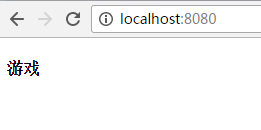
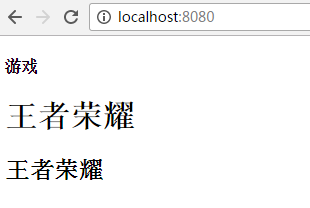
运行的结果发现父组件中内容没有显示在子组件中。
那么game.vue子组件中有slot的情况
1
2
3
4
5
6
<template>
   <div>
      <h4>游戏</h4>
      <slot></slot>
   </div>
</template>
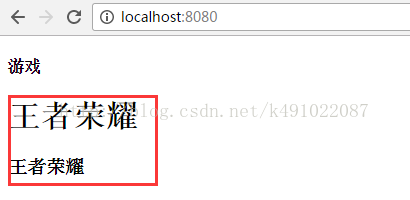
运行结果就会发现父组件中的内容显示在子组件中了
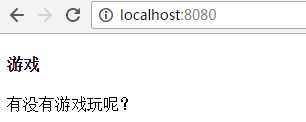
如果父组件中没有传递内容,子组件中slot给默认内容,那么子组件中的默认内容会显示出来。
父组件html中的内容:
1
2
3
<div id="app">
   <game> </game>
</div>
game子组件:
1
2
3
4
5
6
<template>
   <div>
      <h4>游戏</h4>
      <slot>有没有游戏可以玩?</slot>
   </div>
</template>
运行结果会显示子组件中的slot中的内容
具名slot
slot元素可以用一个特殊的属性name 来配置如何分发内容,多个slot可以有不同的名字,根据具名slot的name来进行匹配,显示内容。如果有默认的slot,那么没有匹配到的内容将会显示到默认的slot中,如果没有默认的slot,那么没有匹配到的内容将会被抛弃
父组件中的内容
1
2
3
4
5
<game>
   <h1 slot="k1">王者荣耀</h1>
   <h2 slot="k2">王者荣耀</h2>
   <p>小学生要背锅</p>
</game>
子组件中的slot有name属性,与父组件的slot的值相对应,那么久会匹配到。没有匹配到的先会显示在默认的slot中。
1
2
3
4
5
6
7
8
<template>
   <div>
      <h4>游戏</h4>
      <slot name="k1"></slot>
      <slot name="k2"></slot>
      <slot></slot>
   </div>
</template>
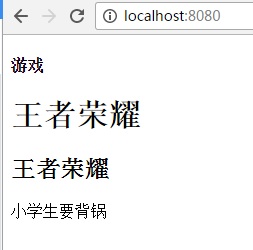
运行结果:当子组件有默认的slot时,会显示没有匹配到的内容 “小学生要背锅”
如果子组件中没有默认的slot时
1
2
3
4
5
6
7
<template>
   <div>
      <h4>游戏</h4>
      <slot name="k1"></slot>
      <slot name="k2"></slot>
   </div>
</template>
那么运行的结果,将会把父组件中没有匹配到的内容 “小学生要背锅” 给抛弃掉
编译作用域
父组件模板的内容在父组件作用域内编译;子组件模板的内容在子组件作用域内编译
父组件模板:
1
2
3
4
5
6
7
<game>

   <p>{{ msg }}</p>

   <h1 slot="k1">王者荣耀</h1>
   <h2 slot="k2">王者荣耀</h2>
</game>
父组件的js文件 main.js
1
2
3
data: {
   msg: "游戏排行榜",
}
子组件模板
1
2
3
4
5
6
7
8
9
10
<template>
   <div>

      <h4>{{ msg }}</h4>

      <slot name="k1"></slot>
      <slot name="k2"></slot>
      <slot></slot>
   </div>
</template>
子组件的js文件 game.js
1
2
3
4
5
6
7
8
let vm = {
   data() {
      return {
         msg: "背锅侠",
      }
   }
}
export  default vm
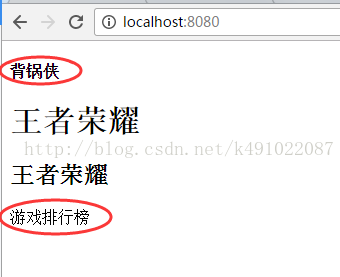
运行的结果如下图,可以发现父组件的内容 “游戏排行榜” 在父组件作用域内编译,并且显示在子组件的默认slot中,而子组件中的内容 “背锅侠”在子组件作用域内编译,显示在子组件中。
具名插槽的缩写
跟 v-on 和 v-bind 一样,v-slot 也有缩写,即把参数之前的所有内容 (v-slot:) 替换为字符 #。例如 v-slot:header 可以被重写为 #header
注意
在 2.6.0 中,我们为具名插槽和作用域插槽引入了一个新的统一的语法 (即 v-slot 指令)。它取代了 slot 和 slot-scope