Observed和ObjectLink基本使用
@Observed和@ObjectLink基本使用
Observed和ObjectLink基本使用
@Observed和@ObjectLink基本使用
鸿蒙next中装饰器(包括@State、@Prop、@Link、@Provide和@Consume装饰器)仅能观察到第一层的变化,但是在实际应用开发中,应用会根据开发需要,封装自己的数据模型。对于多层嵌套的情况,比如二维数组,或者数组项class,或者class的属性是class,他们的第二层的属性变化是无法观察到的。这就引出了@Observed/@ObjectLink装饰器。
概述
@ObjectLink和@Observed类装饰器用于在涉及嵌套对象或数组的场景中进行双向数据同步:
- 使用new创建被@Observed装饰的类,可以被观察到属性的变化。
- 子组件中@ObjectLink装饰器装饰的状态变量用于接收@Observed装饰的类的实例,和父组件中对应的状态变量建立双向数据绑定。这个实例可以是数组中的被@Observed装饰的项,或者是class object中的属性,这个属性同样也需要被@Observed装饰。
- @Observed用于嵌套类场景中,观察对象类属性变化,要配合自定义组件使用(示例详见嵌套对象),如果要做数据双/单向同步,需要搭配@ObjectLink或者@Prop使用(示例详见@Prop与@ObjectLink的差异)。
简单示例
1
2
3
4
5
6
7
8
9
10
11
12
13
14
15
16
17
18
19
20
21
22
23
24
25
26
27
28
29
30
31
32
33
34
35
36
37
38
39
40
41
42
43
44
45
46
47
48
49
50
51
52
53
54
55
56
@Observed
export class People {
  name: string
  list: Fruits[]
  info: Info

  constructor(
    name: string,
    list: Fruits[],
    info: Info,
  ) {
    this.name = name
    this.list = list
    this.info = info
  }
}

@Observed
export class Info {
  age: string
  friends: Friends[]

  constructor(
    age: string,
    friends: Friends[]
  ) {
    this.age = age
    this.friends = friends
  }
}

@Observed
export class Friends {
  // ⚠️⚠️⚠️这里id很关键啊,作为Foreach的唯一key
  data_id?: string = String(Math.floor(100000 + Math.random() * 900000)) // 随机生成唯一ID
  friend: string

  constructor(
    friend: string
  ) {
    this.friend = friend
  }
}

@Observed
export class Fruits {
  // ⚠️⚠️⚠️这里id很关键啊,作为Foreach的唯一key
  data_id?: string = String(Math.floor(100000 + Math.random() * 900000)) // 随机生成唯一ID
  fruits: string

  constructor(
    fruits: string
  ) {
    this.fruits = fruits
  }
}
1
2
3
4
5
6
7
8
9
10
11
12
13
14
15
16
17
18
19
20
21
22
23
24
25
26
27
28
29
30
31
32
33
34
35
36
37
38
39
40
41
42
43
44
45
46
47
48
49
50
51
52
53
54
55
56
57
58
59
60
61
62
63
64
65
66
67
68
69
70
71
72
73
74
75
76
77
78
79
80
81
82
83
84
85
86
87
88
89
90
91
92
93
94
95
96
97
98
99
100
101
102
103
104
105
106
107
108
109
110
111
112
113
114
115
116
117
118
119
120
121
122
123
124
125
126
127
128
129
130
131
132
133
134
135
136
137
138
139
140
141
142
143
144
145
146
147
148
149
import { People, Info, Friends, Fruits } from './Observed'

@Entry
@Component
struct Index {
  @State data: People = new People(
    '张三',
    [new Fruits('苹果')],
    new Info('18', [new Friends('小明')]),
  )

  build() {
    Column() {
      Text('Parent').title()
      Column() {
        Text(`姓名:${this.data.name}`)
        Text(`年龄:${this.data.info.age}`)
        Age({ info: this.data.info })
        TextInput({ text: this.data.name }).onChange(e => this.data.name = e)

        Column() {
          Text('List内容')
          Row() {
            Button('增加')
              .onClick(() => {
                this.data.list = [...this.data.list, new Fruits('香蕉')]
              })
            Button('修改第一项')
              .onClick(() => {
                // 方法一
                const newList = [...this.data.list]; // 先复制
                newList.splice(0, 1, new Fruits('梨子')); // 替换第一项
                this.data.list = newList; // 触发更新

                // 方法二
                // const newList = [...this.data.list]; // 浅拷贝数组
                // newList[0] = new Fruits('梨子'); // 替换第一项
                // this.data.list = newList; // 触发 UI 更新
              })
            Button('重置')
              .onClick(() => {
                this.data.list = [new Fruits('苹果')]
              })
          }

          ForEach(this.data.list, (item: Fruits, index: number) => {
            Text(`水果1:${item.fruits}`)
            Row() {
              Text(`水果:${item.fruits}`)
              TextInput({ text: item.fruits })
                .layoutWeight(1)
                .onChange(e => item.fruits = e)
              Button('-').onClick(() => this.data.list = this.data.list.filter((_e, i) => i !== index))
            }
          }, (item: Fruits) => item.data_id) // ⚠️ 关键:这里指定 key
        }

        Column() {
          Text('Info内容')
          Child({ info: this.data.info })
        }

      }.layoutWeight(1)

      Button('查看数据').onClick(() => console.log(JSON.stringify(this.data)))
    }
    .borderWidth(6)
    .borderColor(Color.Red)
  }
}

@Component
struct Age {
  @ObjectLink info: Info

  build() {
    Column() {
      Text('Age组件').title()
      Row() {
        Text(`年龄:${this.info.age}`)
        TextInput({ text: this.info.age }).onChange(e => this.info.age = e).layoutWeight(1)
      }
    }
    .borderWidth(3)
    .borderColor(Color.Yellow)
  }
}

@Component
struct Child {
  @ObjectLink info: Info

  build() {
    Column() {
      Text('Child组件').title()
      Row() {
        Text(`年龄:${this.info.age}`)
        TextInput({ text: this.info.age }).onChange(e => this.info.age = e).layoutWeight(1)
      }

      Column() {
        Button('增加')
          .onClick(() => {
            this.info.friends = [...this.info.friends, new Friends('小丽')]
          })
        ForEach(this.info.friends, (friend: Friends, i: number) => {
          Grandchild({ friend: friend, info: this.info })
        }, (item: Friends) => item.data_id) // ⚠️ 关键:这里指定 key
      }
    }
    .borderWidth(3)
    .borderColor(Color.Blue)
  }
}

// 允许@ObjectLink装饰的数据属性赋值
// this.item.fruits= ...
// 不允许@ObjectLink装饰的数据自身赋值
// this.item= ...
@Component
struct Grandchild {
  @ObjectLink info: Info
  @ObjectLink friend: Friends
  onDelete?: () => void

  build() {
    Column() {
      Text('Grandchild组件').title()
      Row() {
        Text(this.info.age)
        TextInput({ text: this.info.age }).onChange(e => this.info.age = e).layoutWeight(1)
      }

      Row() {
        Text(`年龄:${this.friend.friend}`)
        TextInput({ text: this.friend.friend }).onChange(e => this.friend.friend = e).layoutWeight(1)
      }
    }
    .borderWidth(2)
    .borderColor(Color.Green)
  }
}

@Extend(Text)
function title() {
  .width('100%')
  .textAlign(TextAlign.Start)
  .fontWeight(FontWeight.Bold)
}
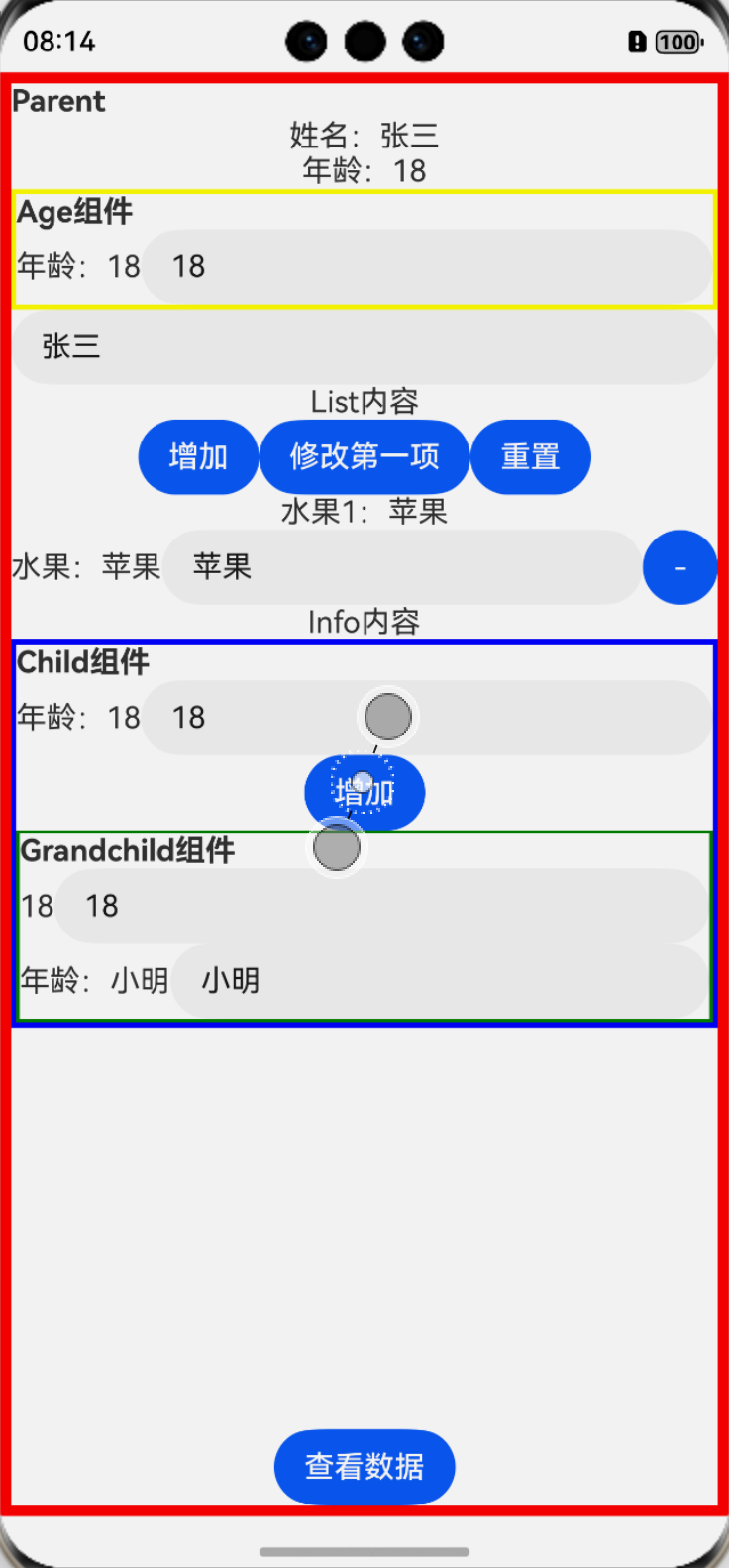
相关操作后的效果:
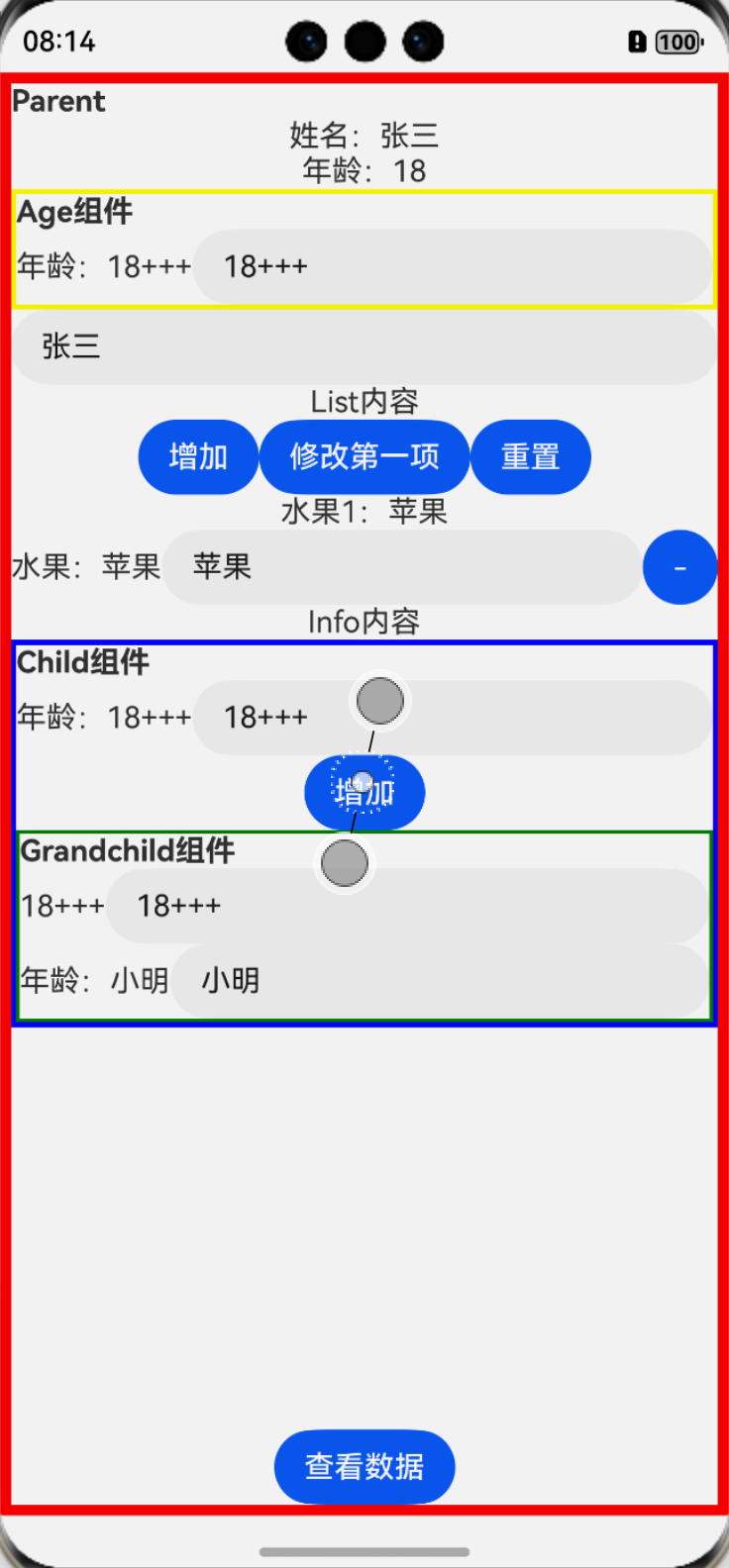
上面展示了 “**age**”属性的变化更新,不管几层嵌套 只要有@ObjectLink 装饰器,都能观察到相关更新
这**时候发现子组件修改状态只有它本身能观察到**
这里的**list**不能使用**push()**、**pop()**等方法,这些方法虽能修改数组本身,****而不是创建一个新数组。数组的引用地址没有改变,因此ArkUI无法检测到变化。
⚠️⚠️⚠️****数组的一定要加一个唯一值,保证唯一 不然会有很多奇奇怪怪的问题
本文由作者按照 CC BY 4.0 进行授权