集成-极光
集成-极光
集成-极光
环境
react-native:0.68.5
注意‼️
使用最新版的 jpush-react-native 会有问题(autolink会有问题)
这时极光推送技术人员告知升级RN版本,我也尝试了升级 但是奈何依赖太多 升级后问题太多了,所以这一方案pass
只能去尝试 低版本的 jpush-react-native 但是它又依赖 jcore-react-native,他俩版本也有要求的 不符合 就会闪退等各种问题
还有就是中间要是碰到奇奇怪怪的问题 大概率就是版本问题
最终版本
1
2
3
4
"jcore-react-native": "2.1.3",
"jpush-react-native": "3.0.3",

"react-native": "0.68.5",
�
Android
/android/app/build.gradle **defaultConfig **下增加
:::tips manifestPlaceholders = [
1
2
3
JPUSH_APPKEY: "44e23e4945f1b68960fc52f1",         //在此替换你的APPKey

JPUSH_CHANNEL: "dev"        //在此替换你的channel
]
:::
这里注意 JPUSH_APPKEY不能乱填 必须和后台创建的应用保持一致
/android/app/src/main/AndroidManifest.xml
:::tips
<meta-data
android:name=”JPUSH_CHANNEL”
android:value=”${JPUSH_CHANNEL}” />
<meta-data
android:name=”JPUSH_APPKEY”
android:value=”${JPUSH_APPKEY}” />
:::
/android/app/src/main/java/com/xiaota/jtgl/MainApplication.java
:::tips import cn.jiguang.plugins.push.JPushModule;
�
// 在 onCreate 方法下加如下代码
@Override
public void onCreate() {
super.onCreate();
// If you opted-in for the New Architecture, we enable the TurboModule system
ReactFeatureFlags.useTurboModules = BuildConfig.IS_NEW_ARCHITECTURE_ENABLED;
SoLoader.init(this, /* native exopackage */ false);
//调用此方法:点击通知让应用从后台切到前台
JPushModule.registerActivityLifecycle(this);
initializeFlipper(this, getreactnativeHost().getReactInstanceManager());
}
:::
官网给的其它步骤不需要 因为有 autolink
碰到一个奇葩问题:debug包能立马获取到
rid,生产包需要两分钟左右(一开始还以为获取不到 谁想要这么久)目前还没解决😭
iOS
准备
ios 证书设置指南
这里的鉴权方式我选的是 方式二:通过 APNs Auth Key 鉴权
- 然后打开Xcode,注意以下红圈地方即可:
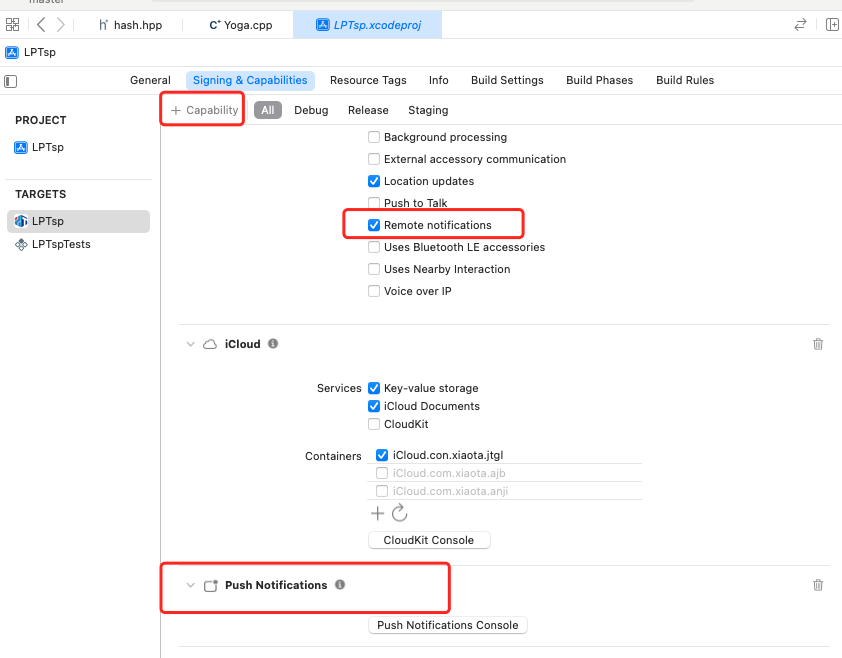
- 进入到 iOS 目录执行
pod install
注意:如果项目里使用pod安装过,请先执行命令
pod deintegrate
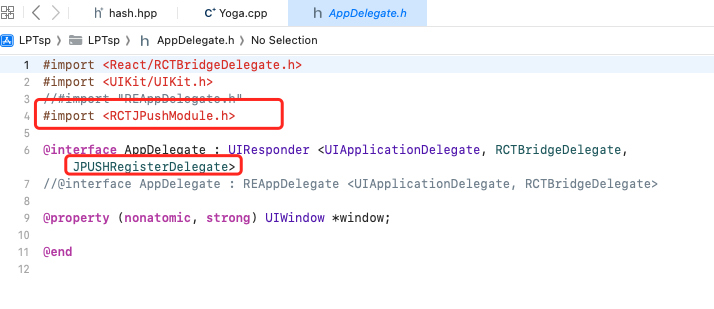
- AppDelegate.h
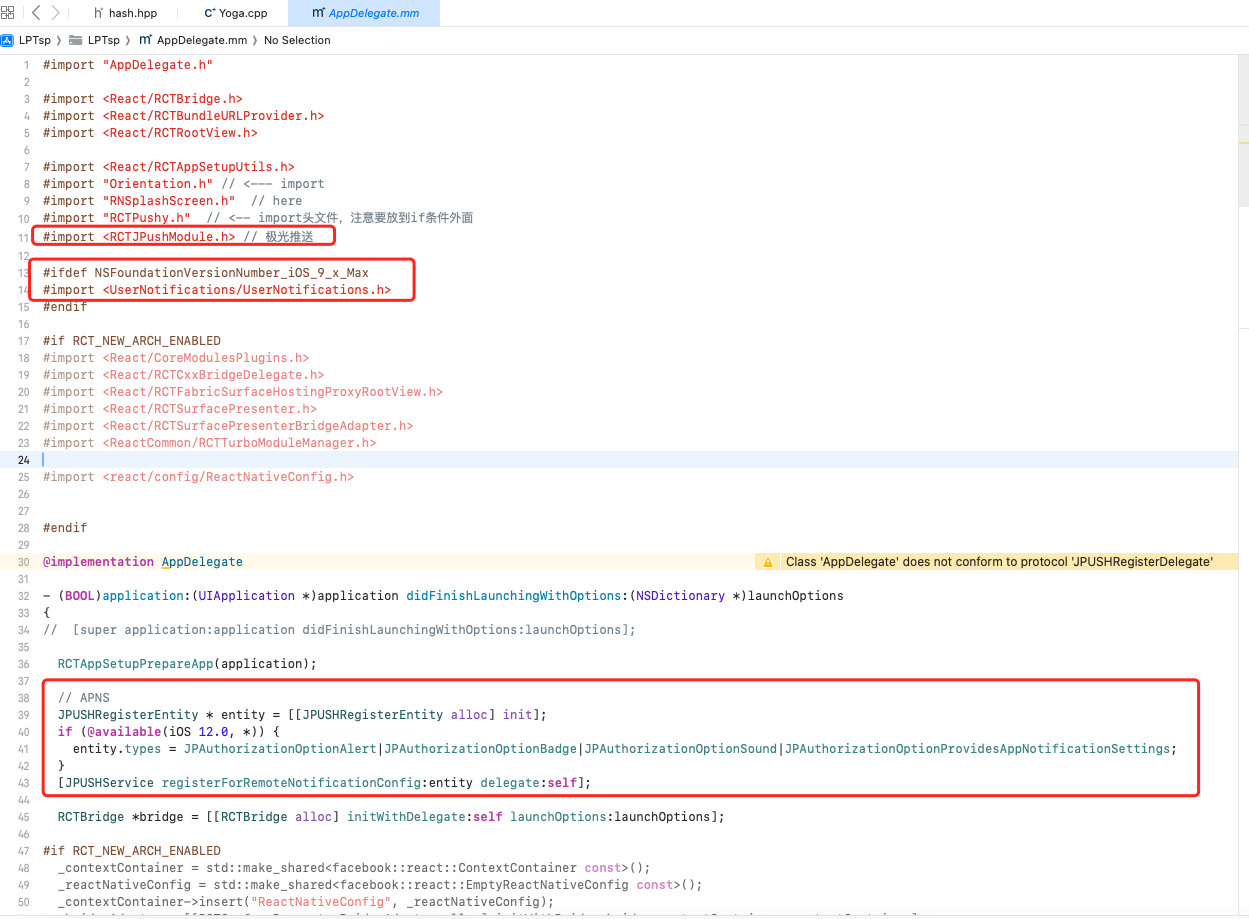
- AppDelegate.mm
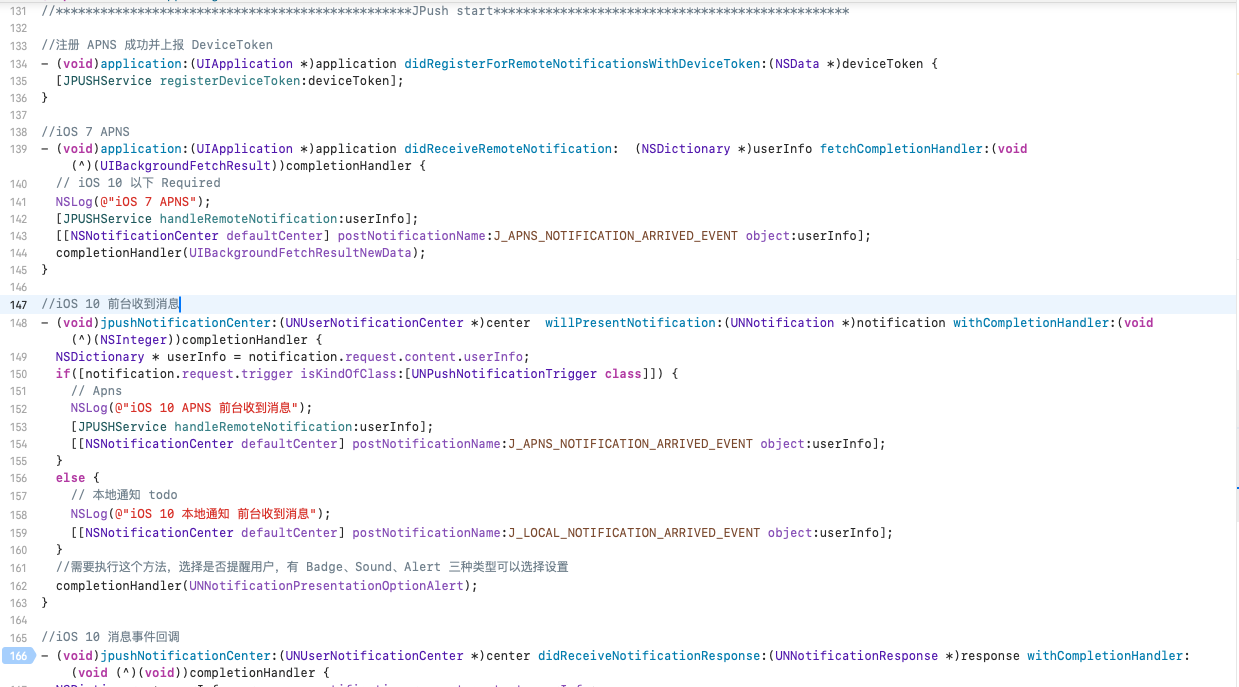
1
2
3
4
5
6
7
8
9
10
11
12
13
14
15
16
17
18
19
20
21
22
23
24
25
26
27
28
29
30
31
32
33
34
35
36
37
38
39
40
41
42
43
44
45
46
47
48
49
50
51
52
53
54
55
56
57
58
59
60
61
62
63
64
65
66
67
68
//************************************************JPush start************************************************

//注册 APNS 成功并上报 DeviceToken
- (void)application:(UIApplication *)application didRegisterForRemoteNotificationsWithDeviceToken:(NSData *)deviceToken {
  [JPUSHService registerDeviceToken:deviceToken];
}

//iOS 7 APNS
- (void)application:(UIApplication *)application didReceiveRemoteNotification:  (NSDictionary *)userInfo fetchCompletionHandler:(void (^)(UIBackgroundFetchResult))completionHandler {
  // iOS 10 以下 Required
  NSLog(@"iOS 7 APNS");
  [JPUSHService handleRemoteNotification:userInfo];
  [[NSNotificationCenter defaultCenter] postNotificationName:J_APNS_NOTIFICATION_ARRIVED_EVENT object:userInfo];
  completionHandler(UIBackgroundFetchResultNewData);
}

//iOS 10 前台收到消息
- (void)jpushNotificationCenter:(UNUserNotificationCenter *)center  willPresentNotification:(UNNotification *)notification withCompletionHandler:(void (^)(NSInteger))completionHandler {
  NSDictionary * userInfo = notification.request.content.userInfo;
  if([notification.request.trigger isKindOfClass:[UNPushNotificationTrigger class]]) {
    // Apns
    NSLog(@"iOS 10 APNS 前台收到消息");
    [JPUSHService handleRemoteNotification:userInfo];
    [[NSNotificationCenter defaultCenter] postNotificationName:J_APNS_NOTIFICATION_ARRIVED_EVENT object:userInfo];
  }
  else {
    // 本地通知 todo
    NSLog(@"iOS 10 本地通知 前台收到消息");
    [[NSNotificationCenter defaultCenter] postNotificationName:J_LOCAL_NOTIFICATION_ARRIVED_EVENT object:userInfo];
  }
  //需要执行这个方法,选择是否提醒用户,有 Badge、Sound、Alert 三种类型可以选择设置
  completionHandler(UNNotificationPresentationOptionAlert);
}

//iOS 10 消息事件回调
- (void)jpushNotificationCenter:(UNUserNotificationCenter *)center didReceiveNotificationResponse:(UNNotificationResponse *)response withCompletionHandler: (void (^)(void))completionHandler {
  NSDictionary * userInfo = response.notification.request.content.userInfo;
  if([response.notification.request.trigger isKindOfClass:[UNPushNotificationTrigger class]]) {
    // Apns
    NSLog(@"iOS 10 APNS 消息事件回调");
    [JPUSHService handleRemoteNotification:userInfo];
    // 保障应用被杀死状态下,用户点击推送消息,打开app后可以收到点击通知事件
    [[RCTJPushEventQueue sharedInstance]._notificationQueue insertObject:userInfo atIndex:0];
    [[NSNotificationCenter defaultCenter] postNotificationName:J_APNS_NOTIFICATION_OPENED_EVENT object:userInfo];
  }
  else {
    // 本地通知
    NSLog(@"iOS 10 本地通知 消息事件回调");
    // 保障应用被杀死状态下,用户点击推送消息,打开app后可以收到点击通知事件
    [[RCTJPushEventQueue sharedInstance]._localNotificationQueue insertObject:userInfo atIndex:0];
    [[NSNotificationCenter defaultCenter] postNotificationName:J_LOCAL_NOTIFICATION_OPENED_EVENT object:userInfo];
  }
  // 系统要求执行这个方法
  completionHandler();
}

- (void)jpushNotificationAuthorization:(JPAuthorizationStatus)status withInfo:(NSDictionary *)info {

}


//自定义消息
- (void)networkDidReceiveMessage:(NSNotification *)notification {
  NSDictionary * userInfo = [notification userInfo];
  [[NSNotificationCenter defaultCenter] postNotificationName:J_CUSTOM_NOTIFICATION_EVENT object:userInfo];
}

//************************************************JPush end************************************************
使用
在App.js 的 componentDidMount 中加入
1
2
3
4
5
6
7
8
9
10
11
12
13
14
15
16
17
18
19
20
21
22
23
24
25
26
27
28
29
30
31
32
33
34
35
JPush.init({
  appKey: '44e23e4945f1b68960fc52f1',
  channel: 'dev',
  production: 1,
});
//连接状态
this.connectListener = result => {
  console.log('connectListener:' + JSON.stringify(result));
  JPush.getRegistrationID(({registerID}) => {
    console.log('registerID:', registerID);
    global.registerID = registerID;
    DeviceEventEmitter.emit('registerID', registerID);
  });
};
JPush.addConnectEventListener(this.connectListener);
//通知回调
this.notificationListener = result => {
  console.log("notificationListener:" + JSON.stringify(result))
};
JPush.addNotificationListener(this.notificationListener);
//本地通知回调
this.localNotificationListener = result => {
  console.log("localNotificationListener:" + JSON.stringify(result))
};
JPush.addLocalNotificationListener(this.localNotificationListener);
//tag alias事件回调
this.tagAliasListener = result => {
  console.log("tagAliasListener:" + JSON.stringify(result))
};
JPush.addTagAliasListener(this.tagAliasListener);
//手机号码事件回调
this.mobileNumberListener = result => {
  console.log("mobileNumberListener:" + JSON.stringify(result))
};
JPush.addMobileNumberListener(this.mobileNumberListener);
�Android通知权限授权
1
2
3
4
5
6
7
8
9
10
11
12
13
14
15
16
17
18
19
20
21
22
23
24
25
26
27
28
29
30
// Android通知权限
requestNotificationPermission() {
  if (Platform.OS ==='android'){
    console.log(99999)
    try {
      PermissionsAndroid.check('android.permission.POST_NOTIFICATIONS').then(
        response => {
          if (!response){
            console.log(88888)
            PermissionsAndroid.request('android.permission.POST_NOTIFICATIONS',{
              title: 'Notification',
              message:
                'App needs access to your notification ' +
                'so you can get Updates',
              buttonNeutral: 'Ask Me Later',
              buttonNegative: 'Cancel',
              buttonPositive: 'OK',
            });
          }
        }
      ).catch(
        err => {
          console.log('Notification Error=====>',err);
        }
      );
    } catch (err){
      console.log(err);
    }
  }
}
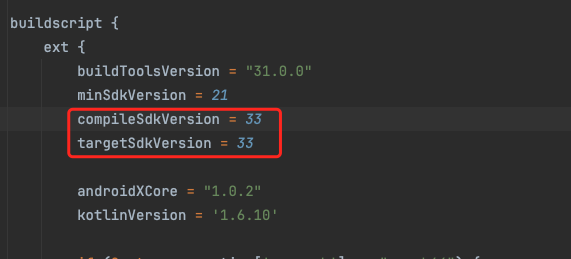
请求通知权限状态并获取通知设置值:
- 您必须至少以 SDK 33 为目标才能在 Android 13+ 上执行运行时请求。