ReactNavigation6-x
ReactNavigation 6.x
ReactNavigation 6.x
npm install @react-navigation/native react-native-screens react-native-safe-area-context @react-navigation/drawer� @react-navigation/native-stack� @react-navigation/bottom-tabs
:::
React Native 0.60 更高版本执行:
:::success npx pod-install ios
:::
重新打包,尽情玩耍吧!!!
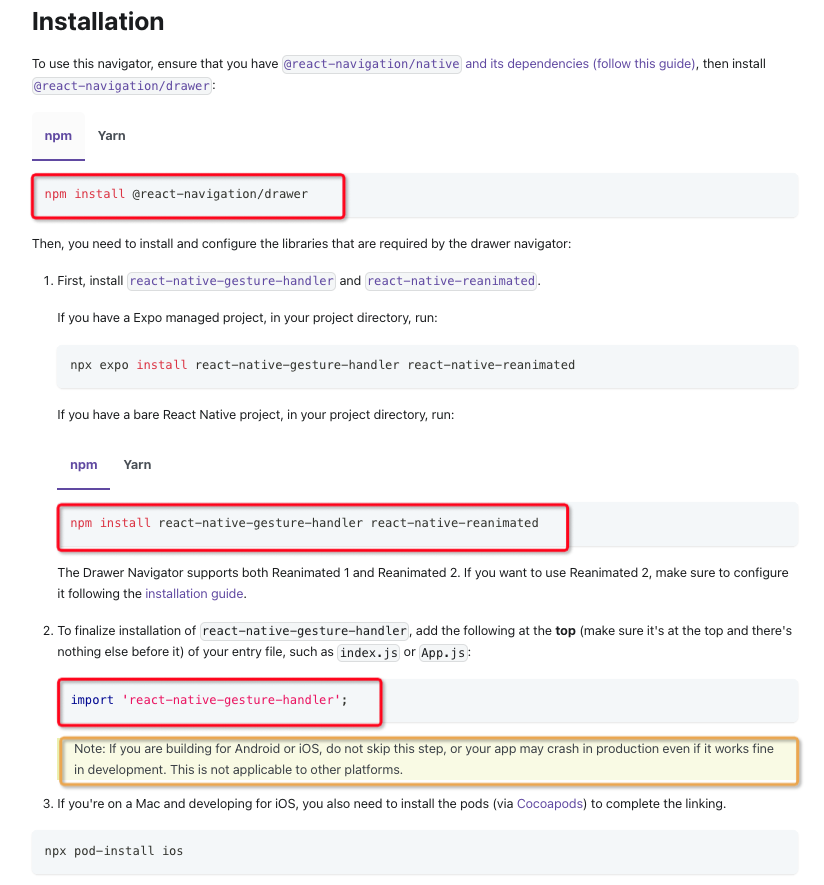
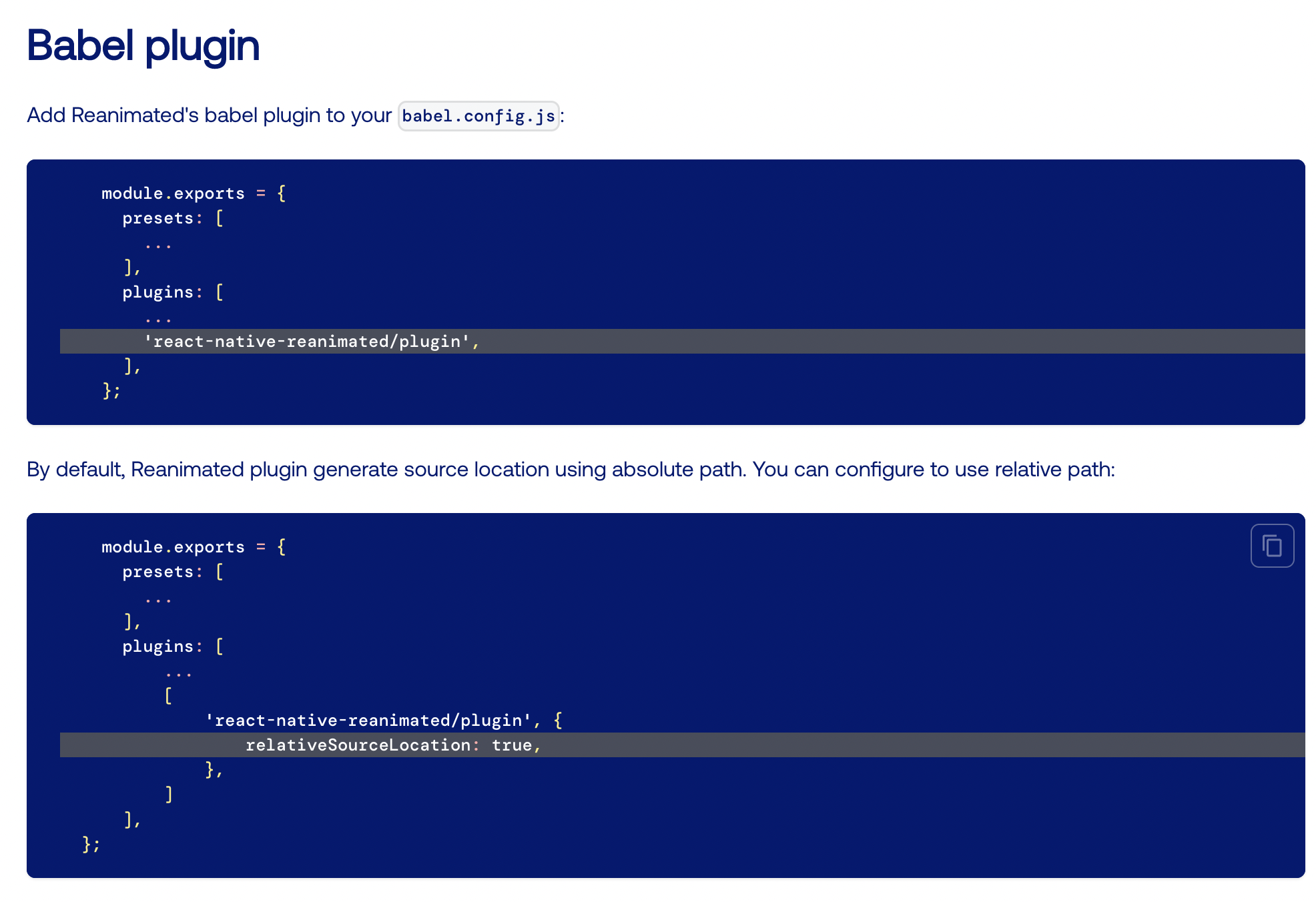
稍有不注意就有坑!!! 使用 @react-navigation/drawer� 抽屉组件时需要注意:(我当时是最后单独安装的 **@react-navigation/drawer�,**可能一开始一起安装不会出现问题)
- 下载依赖
npm install react-native-gesture-handler react-native-reanimated- 在
index.jsorApp.js引用import 'react-native-gesture-handler'- 在
babel.config.js添加plugins: ['react-native-reanimated/plugin']- 最后
npx pod-install ios过程中编译可能还会报错,可以尝试npm start --reset-cache
具体参考下面截图
基础用法
路由跳转
navigation.navigate('RouterName')�跳转到指定路由(当前路由不做跳转)navigation.push('RouterName')�跳转到指定路由(不限制路由)navigation.goBack()返回上一级navigation.popToTop()返回到第一屏
传参
// 1、 navigation.navigate(‘Details’, { itemId: 86, otherParam: ‘anything you want here’, })
// 2、 navigation.navigate({ name: ‘Home’, params: {post: postText}, merge: true, });
const {navigation, route} = props; const {params} = route;
navigation.setParams({ query: ‘someText’, });
配置头部
配置title
// 1. <Stack.Screen name=”Home” component={HomeScreen}
options={{title: ‘My home’}}
/>
// 2. <Stack.Screen name=”Home” component={HomeScreen} options={({route}) => ({title: route.params.name})} />
navigation.setOptions({title: ‘Updated!’})
调整头部样式
headerStyle: 包装页眉的视图的样式对象headerTintColor: 后退按钮和标题都使用此属性作为颜色headerTitleStyle: 自定义标题的fontFamily、fontWeight和其他Text样式的属性
function StackScreen() { return (
1
2
3
4
5
6
7
8
9
10
11
12
13
    options={{
      title: 'My home',
      headerStyle: {
        backgroundColor: '#f4511e',
      },
      headerTintColor: '#fff',
      headerTitleStyle: {
        fontWeight: 'bold',
      },
    }}

  />
</Stack.Navigator>   ); }
共享常用配置
function StackScreen() { return ( <Stack.Navigator
1
2
3
4
5
6
7
8
9
10
11
12
13
14
15
16
17
18
19
  screenOptions={{
    headerStyle: {
      backgroundColor: '#f4511e',
    },
    headerTintColor: '#fff',
    headerTitleStyle: {
      fontWeight: 'bold',
    },
  }}

>
  <Stack.Screen
    name="Home"
    component={HomeScreen}

    options={{ title: 'My home' }}

  />
</Stack.Navigator>   ); }
用自定义组件替换标题
function LogoTitle() { return ( <Image
1
2
3
4
  style={{ width: 50, height: 50 }}

  source={require('@expo/snack-static/react-native-logo.png')}
/>   ); }
function StackScreen() { return (
1
2
3
4
    options={{ headerTitle: (props) => <LogoTitle {...props} /> }}

  />
</Stack.Navigator>   ); }
头部按钮
向页眉添加按钮
**headerShown**�** 隐藏头部**headerTitleheaderRightheaderLeft(可用于覆盖返回按钮)
……