react-native-share
react-native-share
react-native-share
react-native-share
一个简单的分享消息和文件到其他应用的工具
本人环境:react-native:0.59.8
If you are using react-native >= 0.60.0 please use react-native-share >= 2.0.0 If you are using react-native <= 0.59.10 please use react-native-share <= 1.2.1 node 版本也有要求 本人 v14.19.1
下载
npm install react-native-share@1.2.1 --save
IOS
- In XCode, in the project navigator, right click** **Libraries** **➜** **Add Files to [your project’s name]
- Go to** **node_modules** **➜** **react-native-share** **➜** **ios** **and add** **RNShare.xcodeproj
- In XCode, in the project navigator, select your project. Add** **libRNShare.a** **to your project’s** **Build Phases** **➜** **Link Binary With Libraries
- In XCode, in the project navigator, select your project. Add** **Social.framework** **and** **MessageUI.framework** **to your project’s** **General** **➜** **Linked Frameworks and Libraries
- In iOS 9 or higher, You should add app list that you will share. If you want to share Whatsapp and Mailto, you should write** **LSApplicationQueriesSchemes** **in info.plist
1
2
3
4
5
<key>LSApplicationQueriesSchemes</key>
<array>
  <string>whatsapp</string>
  <string>mailto</string>
</array>
- (Optional) Also following lines allows users to save photos, add them in** **info.plist
1
2
<key>NSPhotoLibraryAddUsageDescription</key>
<string>$(PRODUCT_NAME) wants to save photos</string>
- Run your project (Cmd+R)
Android
使用
1
2
3
4
5
6
7
8
9
10
11
12
const options: any = {
  title: "React Native",
  message: "Hola mundo",
  url: "http://facebook.github.io/react-native/",
  subject: "Share Link" //  for email
}
try {
  const shareResponse = await Share.open(options);
  console.log(shareResponse)
} catch (e) {
  console.log(e)
}
注意
node 版本低会有奇怪报错
在调用 Share.open 的方法之后,app会闪退
Illegal callback invocation from native module. This callback type only perm
查阅文档之后发现确实是 react-native-share更新了一个版本去适配IOS13,但 rn 版本还没有更新,所以会闪退。
解决方法:
RN 0.61.1版本已经修复。若您的版本低于此(也就是本人的 0.59.8 ),可以采用如下方法:
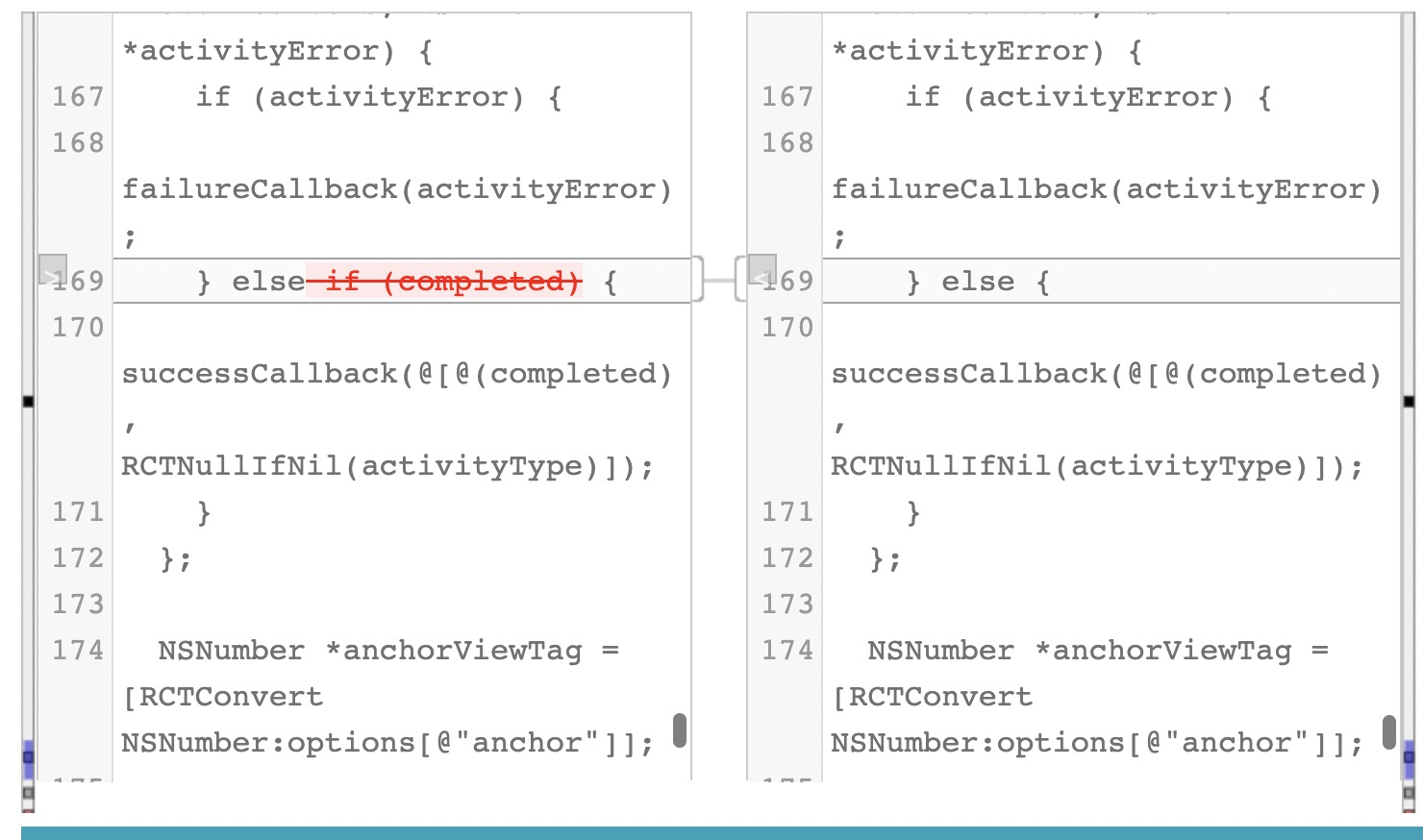
替换node_modules里的文件 路径:react-native/Libraries/ActionSheetIOS/RCTActionSheetManager.m
替换文件直接去这里复制然后粘贴到项目下:https://github.com/facebook/react-native/blob/0.61-stable/Libraries/ActionSheetIOS/RCTActionSheetManager.m
修复差异图:
- xcode11及以上ios运行报错解决方法
1
2
3
4
5
6
7
8
9
10
11
12
13
14
15
16
17
18
19
20
21
22
23
24
25

报错信息:
Unknown argument type"attribute_inmethod-irctappstate
getcurrentappstate: error: Extend
Rctconvert to support this type.

以上报错造成原因是由于Xcode11之后,使用了低于0.59.9版本的React Native。

报错解放方案:

方案一.找到node_modules/react-native/React/Base/RCTModuleMethod.mm中修改RCTParseUnused方法中的代码

修改前:
static BOOL RCTParseUnused(const char **input)
      {
        return RCTReadString(input, "__unused") ||
              RCTReadString(input, "__attribute__((unused))");
      }
修改后:
static BOOL RCTParseUnused(const char **input)
      {
        return RCTReadString(input, "__unused") ||
              RCTReadString(input, "__attribute__((__unused__))") ||    //添加这行代码
              RCTReadString(input, "__attribute__((unused))");
      }
本文由作者按照 CC BY 4.0 进行授权